Twenty per second, and then thirty
Scaling means making a system handle more load than it does today. There are only two ways to do it — a bigger machine or more machines — and the interesting part is everything that changes when you pick the second one.
- scaling
- system-design
- infrastructure
- cloud-costs
- backend
Every scaling conversation I've sat in started somewhere in the middle — sharding, autoscaling groups, "should we go multi-region." Almost none of them started with the only question that makes the rest answerable: how much can the thing we already have actually take?
So this post starts there. Capacity is a number. Once you have the number, "scaling" stops being a vibe and becomes arithmetic, and the two available answers get a lot easier to choose between.
This is the layer under the system design post — that one walks the whole sequence from one server to sharding. This one stops and looks hard at a single step of it.
What scaling actually means
Scaling — changing a system so it can handle more load than it handles today.
That's it. Not "making it fast" — that's optimisation, a different lever with a different bill (engineering hours instead of dollars). Not "making it reliable" — that's redundancy, which you often get as a side effect but which is not the goal here.
More load. That's the whole definition.
And there are exactly two ways to get it: make one machine bigger, or use more machines. Everything else in this post is consequences.
How much can one server take?
The unit is RPS — requests per second. How many requests your server can finish in a second before requests start queueing behind each other.
Take a real box: 4 GB RAM, 2 cores at 3.4 GHz. Say you measure it and it handles about 20 requests per second.
Now that number does some work for you:
- 20 × 86,400 seconds = ~1.7 million requests a day
- Your traffic grows to 2.5 million a day
- 2,500,000 ÷ 86,400 = ~29 requests per second
You need 29. You have 20. That's the entire problem, stated in numbers instead of adjectives.
Two things worth being honest about here.
First, 20 RPS is low for two cores. A hello-world endpoint on the same box does tens of thousands. If you're at 20, you're doing real work per request — unindexed queries, an N+1, a synchronous call to someone else's API, image processing. Which means the cheapest capacity you'll ever buy is a profiler, not a bigger instance. Measure before you spend.
Second, and this one bites harder: 1.7 million a day assumes traffic is flat, and traffic is never flat. If half your day's requests land in a four-hour window — which is normal for consumer products — then 2.5M/day is really 1.25M in 14,400 seconds, or 87 RPS at peak. You don't size for the average. You size for the spike, and then you pay for that size during the twenty hours nobody's using it.
That gap between peak and average is where most of the money in this post gets lost.
Make the box bigger
Vertical scaling (scaling up) — adding resources to the machine you already have. More RAM, more cores, faster disk. Same code, same architecture, same deploy.
4 GB and 2 cores becomes 8 GB and 4 cores, and 20 RPS becomes something like 40. Keep going and you're on an m5.8xlarge with 32 vCPUs and 128 GB, handling a hundred.
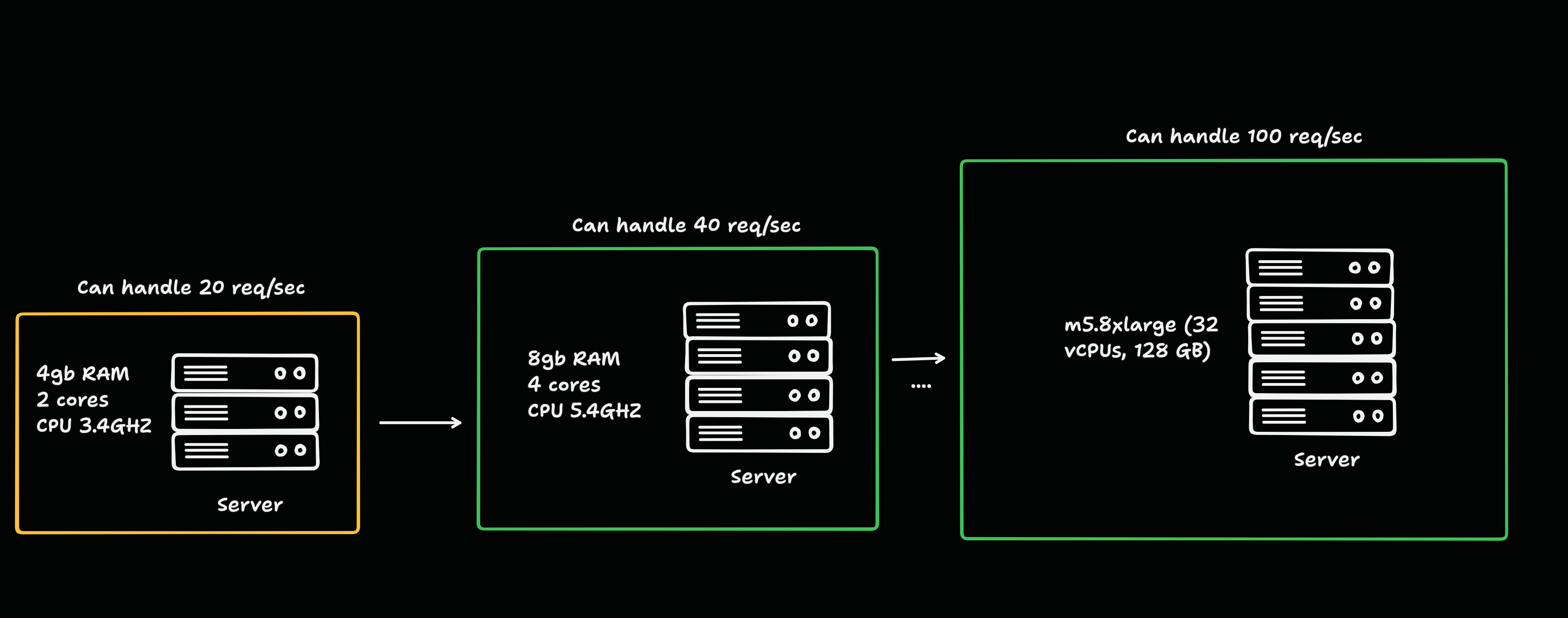
In the cloud this is a resize and a reboot. Your application doesn't know it happened. That is the entire appeal, and it's a bigger appeal than people give it credit for: resizing an instance is an afternoon; splitting a system across machines is a quarter.
Where it runs out — three ceilings:
- The hardware ends. The largest instances you can rent top out in the tens of terabytes of RAM. That's enormous, and it is still finite. Almost nobody hits this. If you do, you're not reading a post like this one.
- The workload stops parallelising. Cores only help the part of a request that can run in parallel. If a meaningful slice of it is inherently serial, extra cores buy less and less.
- It's still one machine. One power supply, one kernel, one bad deploy. Every vertically scaled system has a single point of failure by construction, and no amount of vCPU changes that.
The third one is the real ceiling. The first two are hardware limits; that one is a design limit, and it's the reason people leave.
The trade: you keep every bit of your architecture's simplicity and you accept that the whole thing has one life.
Add more boxes
Horizontal scaling (scaling out) — running more machines and splitting the load between them.
Your two servers handle 20 RPS each. Thirty requests a second arrive. A load balancer sits in front and spreads them, and now you have 40 RPS of headroom instead of 20.
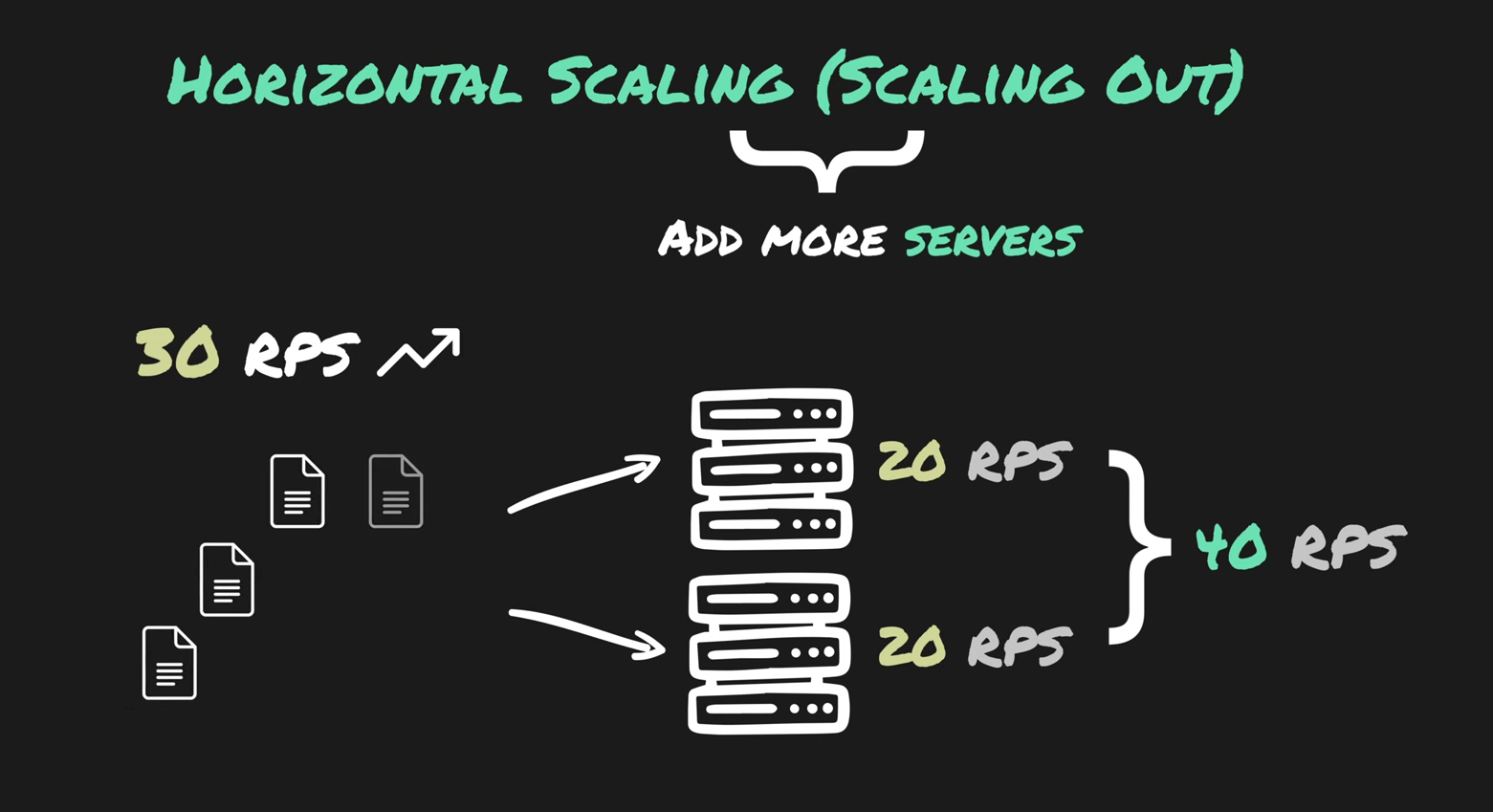
In principle this never ends — you can always rent another box. In practice it ends the moment your application cares which box it's on.
This is the hinge of the whole topic, so:
Stateless — the server keeps nothing about you between requests. Every request carries everything needed to serve it.
If your servers are stateless, horizontal scaling is close to free. Any request can land anywhere. Add nodes, remove nodes, lose a node — nothing notices.
If they're not — a session in local memory, an uploaded file on local disk, an in-process cache, a counter in a variable — then the second server is a bug factory. You log in, get routed to node 1, refresh, get routed to node 2, and you're logged out. Every one of those pieces of state has to move somewhere shared before the second machine is safe to add.
That's why the standard advice for APIs is "just scale horizontally" — REST APIs are usually stateless already, so they get the easy version. It's not that APIs are special. It's that they happened to be built the way this technique requires.
The trade: you swapped a capacity problem for a coordination problem. Where does state live now, what happens when two nodes disagree, and how do you deploy to twelve machines without downtime. This is usually the right swap. It has never once been a free one.
Same idea, five names
Vendors use different words for the same two things, which makes the whole topic sound more complicated than it is:
- Scale up = vertical = bigger machine
- Scale out = horizontal = more machines
- Scale down / scale in = the same two, in reverse
AWS calls a bigger RDS instance "scale up" and read replicas "scale out." Azure puts both as separate buttons. Snowflake calls machine size "warehouse size" and machine count "multi-cluster." Same two ideas every time.
And it isn't a fork in the road. Nearly every real system does both: you size each node sensibly, then you run several of them. Pick the instance that fits one unit of your workload, then add units.
Side by side
| Vertical (scale up) | Horizontal (scale out) | |
|---|---|---|
| What you add | Resources to one machine | More machines |
| Ceiling | Biggest instance available | Practically none |
| If it fails | Everything is down | The rest keep serving |
| Complexity | Unchanged | Load balancing, shared state, service discovery |
| Downtime to scale | Usually a reboot | None |
| Code changes | Almost never | Often — statelessness is a prerequisite |
| Speed to apply | Minutes | Seconds, once it's set up |
| Fits | Relational databases, single-threaded jobs, anything holding state in memory | Stateless APIs, web tiers, workers, queue consumers |
When to scale up
- You haven't measured yet. Bluntly: most "we need to scale" is "we need an index." Profile first.
- The workload can't be split. Single-threaded processes, legacy systems, anything that keeps shared state in memory and would break if it were divided.
- You need one source of truth. A single relational database gives you real transactions for free. Distributing one is a project, not a config change.
- You're small. If one machine does the job, a fleet is just a bigger surface to operate. Over-engineering for traffic you don't have is its own kind of waste.
When to scale out
- You can't afford to be down. This is the strongest reason on either list, and it isn't really about capacity. One machine means one outage. Two means a bad night instead of a bad day.
- Traffic is spiky. Sales, launches, ticket drops, business hours. You can't half-resize a machine, but you can run two nodes at 3 a.m. and eight at noon.
- You've hit the ceiling — the real one, where the next instance size doesn't exist or costs more than the problem.
- The work is already independent. Stateless APIs, background workers, queue consumers. Each request stands alone, so each can go anywhere.
Databases are where it gets hard
Everything above is easy for your application tier and hard for your data, so it's worth separating.
Read replicas are the first move, and the most misunderstood. Copies of the database that serve reads, so the primary only handles writes. This works well and it is not write scaling — every write still goes through one machine. If writes are your bottleneck, replicas do nothing for you.
Sharding splits the data itself: users A–M here, N–Z there. Now writes scale too. It also makes cross-shard queries slow, cross-shard transactions genuinely difficult, and a badly chosen shard key gives you one node on fire while the others idle. Changing that key later is one of the hard migrations.
Which is why the honest default is: scale your database vertically for as long as you can get away with, and scale your application tier horizontally from the start. A big managed Postgres will carry a serious business. Reach for distribution when the ceiling is real, not when it's theoretical.
I'll say plainly that this is the section I'm least experienced in — I've run read replicas, I have not operated a sharded database under load.
What it actually costs
Here's where I disagree with most of what's written on this topic.
The common claim is that horizontal scaling costs 20–40% more in raw compute. Run the numbers on AWS on-demand pricing and that isn't true — at least not within one instance family, where pricing is essentially linear per vCPU:
| Setup | Hourly | ~Monthly (730 h) |
|---|---|---|
| 1 × m5.4xlarge (16 vCPU, 64 GB) | $0.768 | ~$561 |
| 1 × m5.8xlarge (32 vCPU, 128 GB) | $1.536 | ~$1,121 |
| 4 × m5.xlarge (16 vCPU, 64 GB total) | $0.768 | ~$561 |
Four small machines cost the same as one machine of equivalent size. Doubling the box doubles the bill — no premium for going up, no premium for going out.
So the extra cost of horizontal is real, but it isn't the compute. It's:
- The load balancer — a fixed monthly charge plus a usage component, before it has served anything
- Cross-AZ traffic — if you spread across availability zones for the redundancy (and that's the whole point), chatter between nodes is billed per GB in each direction
- Per-node overhead — every machine runs the same agents, sidecars, and base image. Ten nodes pay that ten times
- Headroom, multiplied — you don't run nodes at 100%. Eight nodes at 60% is more idle capacity bought than two nodes at 60%
And the thing that swings it back the other way: horizontal is the only one of the two you can turn off. Two nodes overnight and eight at noon is a genuinely smaller bill than one always-on machine sized for noon. That's the whole argument, and it only pays out if your traffic is actually variable. If you serve a flat load 24/7, autoscaling saves you nothing and you just bought a distributed system for the fun of it.
Prices are us-east-1 on-demand and move around. The ratios hold; check the absolute numbers before you quote them.
The mistake that actually costs money
It isn't picking the wrong direction. Both directions work, and either can be reversed with a weekend and some annoyance.
It's not watching what the decision cost. Scaling changes are made under pressure — traffic is spiking, something is down, someone is on a call — and the thing you do at 2 a.m. to survive the night is almost never revisited at 10 a.m. when it's fine.
The specific shapes this takes:
- A cluster that scaled up for one spike and never scaled back down
- An instance resized for a load test eight months ago
- Read replicas added during an incident, still running, serving nothing
- Autoscaling with a floor set high "to be safe," which quietly makes it a fixed cost with extra steps
None of these are outages. Nothing pages you. That's exactly why they survive — a cluster running forty pods for a workload that needs twelve looks healthy on every dashboard you own. It just costs three times what it should, every month, until someone reads the invoice line by line.
Put a calendar reminder on scaling changes. That's it. That's the fix, and it's worth more than anything else on this page.
If you keep one thing
Measure first, scale up until it hurts, scale out when it does — and put a reminder on anything you change under pressure.
Sources
- CloudZero, "Horizontal vs. Vertical Scaling" — the cost framing, though I ran the AWS arithmetic myself and got a different answer
- Akamai, "Horizontal vs. vertical scaling for APIs" — on statelessness as the precondition
- AWS EC2 on-demand pricing, us-east-1
- Martin Kleppmann, Designing Data-Intensive Applications — chapters 5 and 6