A billion users, on a napkin
Capacity estimation is guessing — but guessing with arithmetic, before you write a line of code. Here's the whole method, worked end to end on YouTube: 30 terabytes a day, a cache the size of a small country, and why one machine was never going to be enough.
- capacity-estimation
- system-design
- back-of-the-envelope
- scaling
- backend
The scaling post made one claim and leaned on it the whole way through: scaling is arithmetic, not vibes. You can only choose between a bigger machine and more machines once you know the number you're trying to hit.
This post is about producing that number before anything exists to measure. No server, no traffic, no dashboard — just a problem statement and the back of a napkin. That's capacity estimation, and it's the first thing that happens in every serious design, whether it's a real system or an interview whiteboard.
The point isn't precision. The point is finding out, in ten minutes, whether the thing you're about to build is even physically possible — and roughly what it'll cost if it is.
What capacity estimation actually is
Capacity estimation — working out how much compute, storage, memory, and bandwidth a system needs, from its requirements alone, before you build it.
It answers three questions, in order of how much they hurt to get wrong:
- Is this feasible at all? Some designs are dead on arrival. If the honest number is "we'd need every server on Earth," you want to know that in minute one, not in month six.
- Where does it break first? Every system has a bottleneck. Estimation tells you whether it's storage, memory, network, or CPU — so you design for that instead of guessing.
- What will it cost? A design can be perfectly functional and still be too expensive to run. The napkin catches that before the invoice does.
None of this needs to be accurate to survive. It needs to be accurate to the nearest order of magnitude — is this a one-server problem, a one-rack problem, or a thousand-machine problem? Those are different worlds, and the napkin tells them apart.
The one rule: round until it's easy
The single biggest mistake people make here is trying to be exact. They reach for a calculator, get a number like 2,847,193, and feel good about it. That number is fake — every input was a guess — and it's harder to work with than the truth.
So the rule is: round aggressively, work in powers of ten, and always round up. A day is 86,400 seconds; call it 100,000, or 10⁵. A million is 10⁶, a billion is 10⁹. When you multiply and divide powers of ten you just add and subtract the exponents, and the whole calculation stays in your head.
Rounding up everywhere means your final number is a conservative over-estimate — which is exactly what you want. Better to provision for a spike that doesn't come than to fall over on launch day.
With that rule in hand, let's actually do one.
Worked example: how big is YouTube?
I'm going to size YouTube's video pipeline from nothing. Watch how far four assumptions get us.
Start with the users.
- Say YouTube has 1 billion users. (10⁹.)
- Almost nobody uploads. Most people only watch. A reasonable guess for the ratio of uploaders to watchers is 1 in 1,000.
- So uploaders = 1,000,000,000 ÷ 1,000 = 1 million uploaders. (10⁶.)
Now, how much video is that?
- Say each uploader posts, on average, 10 minutes of video a day.
- Total new video per day = 1,000,000 × 10 = 10 million minutes. (10⁷.)
How big is a minute of video? We have to derive this, and here's the nice part — you can, from something you already know:
- A 2-hour movie is roughly 4 GB.
- YouTube's codecs and compression are aggressive; assume they shave off ~90%, leaving 10% of that.
- So a 2-hour YouTube video ≈ 0.4 GB. That's 400 MB over 120 minutes → ~3 MB per minute.
Put it together:
10,000,000 minutes/day × 3 MB/minute = 30,000,000 MB ≈ 30 TB of new video every single day.
That's the whole method. Four guesses — user count, upload ratio, minutes per upload, MB per minute — and we have a storage number accurate enough to plan around. A year of this is roughly 10 PB. Now you know what kind of storage system you're even shopping for.
A reality check, because honesty matters here. YouTube actually reports around 500 hours of new video every minute — call it 30,000 minutes a minute, so ~43 million minutes a day. Our napkin said 10 million. We're off by about 4×. And that's fine — we're in the right order of magnitude, we got there in four lines, and the moment we get a real number we swap it in and everything downstream scales with it. Being 4× low on a first-pass estimate is a win, not a failure.
Turning storage into throughput
Storage is a stock — a number that piles up. But some questions are about flow: how fast is data moving? Those live in per-second units, and you get them by dividing the daily number by the seconds in a day.
Say we need to process every uploaded video (transcode it, generate thumbnails, run copyright checks). How much are we processing per second?
30 TB/day ÷ 86,400 seconds ≈ 30,000,000 MB ÷ 90,000 s ≈ ~350 MB/second.
Round up to ~400 MB/s to be safe. That's the sustained ingest the processing tier has to keep up with, aggregated across every data centre. Suddenly a vague requirement ("process all the videos") is a concrete throughput target you can size hardware against.
This flip — daily total ÷ 86,400 → per-second rate — is the most-used move in the whole toolkit. Storage per day becomes bandwidth per second. Requests per day becomes QPS. Same trick every time.
The other starting point: QPS from users
The YouTube example started from content volume. Plenty of systems start from traffic instead, and the move there is just as mechanical.
QPS — queries per second. The rate of requests hitting your system.
If you know daily active users and roughly how often each one acts, you have QPS:
- 500M users, each loading their feed ~10× a day = 5 billion feed loads a day.
- 5,000,000,000 ÷ 86,400 ≈ ~58,000 QPS, round to 60k.
And the number that actually sizes your fleet isn't the average — it's the peak. Traffic isn't flat (the scaling post beats this drum for a reason). If 80% of those loads land in an 8-hour window, peak QPS is closer to 140k, not 60k. You provision for the spike and eat the idle capacity the rest of the day. Average QPS tells you what you'll pay; peak QPS tells you what you must survive.
Sizing the cache: what fits in memory?
Back to YouTube. When you open the app, you see a grid of videos — each is a thumbnail and a title. That has to load instantly, which means it's coming from memory, not disk. So: how much RAM does the thumbnail cache need?
- A thumbnail is a small image — call it 10 KB.
- YouTube won't cache every video ever made. Say it keeps the last 90 days hot.
- New videos a day ≈ 1 million (our uploaders, one video each).
10 KB × 1,000,000 videos × 90 days = 900,000,000 KB ≈ ~1 TB of RAM.
And here's where estimation stops being a party trick and starts driving architecture. You cannot buy a machine with 1 TB of usable cache RAM and call it a day — that's one box, one failure, one bottleneck. So you divide:
- Commodity cache node ≈ 16 GB of usable RAM.
- 1 TB ÷ 16 GB = ~64 nodes just to hold the data once.
But holding it once isn't enough. You want replicas so a node dying doesn't cause a cache miss storm (say 3 copies), and you want that spread across regions so a European user isn't reading from Virginia (say 2). Multiply it out:
64 nodes × 3 replicas × 2 regions ≈ ~400 nodes for the metadata cache alone.
That number wasn't in the requirements. Nobody wrote "you will need a 400-node cache tier." It fell out of the arithmetic — and now it's a real line item in your design and your budget. That's the entire value of doing this early.
Where it forces a real design decision
One more, because it closes the loop back to scaling. Say processing each 1 MB of video involves three steps:
read it (10 ms) + process it (20 ms) + write the result (20 ms) = 50 ms per MB — and that's before you account for exclusive locks and index updates, which only make it worse.
We're ingesting ~400 MB/s. So per second, the work arriving is:
400 MB × 50 ms = 400 × 0.05 s = 20 seconds of processing work, every wall-clock second.
Read that again. Twenty seconds of work needs to happen inside one second. On a single processor that's flatly impossible — you'd fall a further 19 seconds behind with every tick, forever.
Which means the arithmetic itself just told you the architecture: you need at least ~20 processors working in parallel just to break even, and more for headroom. This is horizontal scaling again, except we didn't arrive at it by preference or best practice — we arrived at it because 20 > 1 and there's no arguing with that. The napkin didn't just size the system; it ruled a single-machine design out before anyone drew one.
The numbers worth memorising
Every estimate above rested on knowing roughly what things cost — that a movie is ~4 GB, that a thumbnail is ~10 KB. There's a second set of constants worth burning into memory: how long operations take. Jeff Dean's "Numbers Everyone Should Know" is the canonical list.
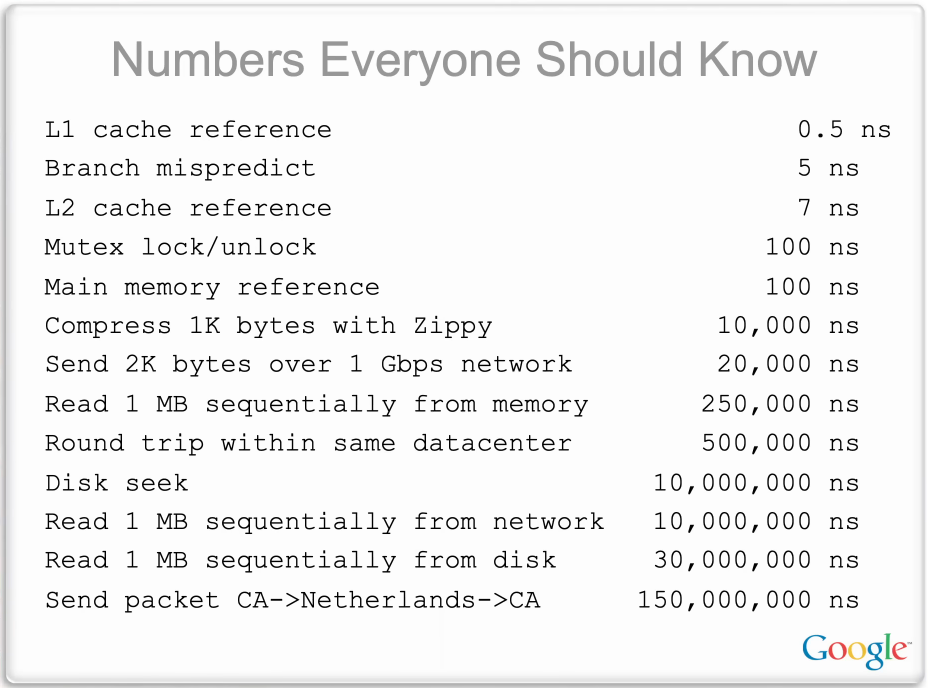
You don't memorise the exact figures. You memorise the ratios, because they're what decide designs:
- Memory is ~100× faster than disk, and disk is ~10× faster than the network. This is the reason caches exist. It's why we spent 400 nodes keeping thumbnails in RAM instead of reading them off disk every time.
- A cross-continent round trip (~150 ms) is roughly a million times a memory reference (~100 ns). Physics doesn't care about your code — a request to another continent has a floor you cannot optimise past. That's why the cache had regional replicas.
- A same-datacenter round trip (~0.5 ms) dwarfs anything local. Chattiness between services costs real time. Ten sequential internal calls is 5 ms of pure waiting before any work happens.
These aren't trivia. Every one of them turned into a design decision above.
If you keep one thing
Estimate before you build: round to powers of ten, turn daily totals into per-second rates by dividing by 86,400, and let the number pick the architecture — because 30 TB a day, a 400-node cache, and 20 seconds of work per second were never going to fit on one machine, and the napkin knew it before anyone wrote code.
Sources
- Jeff Dean & Peter Norvig — "Numbers Everyone Should Know" (Latency Numbers Every Programmer Should Know)
- My own worked notes sizing YouTube's video pipeline — the arithmetic here is reproduced and cleaned up from those
- YouTube's publicly reported upload figures (~500 hours/minute), used as the reality check
- Martin Kleppmann, Designing Data-Intensive Applications — for the storage and throughput framing